Once an application is split into several services, questions come up right away: how does a client find the service it needs? Who checks the token — every service on its own, or one component for all of them? How do you gradually migrate off the old monolith? Structural patterns are ready-made answers to these questions.
Let's go through the ten most common ones — from simple gateways to Service Mesh.
API Gateway
Imagine your city has a dozen restaurants, each at its own address. Instead of memorizing every address, people go to a single shopping mall — and once inside, it's clear where to go. API Gateway is that shopping mall for your services.
Problem. A client (a mobile app, a browser) shouldn't need to know the addresses of every service inside the system. And if each service checks the token, sets request limits, and logs on its own — that's the same code copied across ten places.
Solution. The Gateway accepts all incoming requests and routes each one to the right service. Cross-cutting concerns — authentication, rate limiting, CORS, logging — are handled here once.

An example route configuration in a NestJS gateway with http-proxy-middleware:
import { createProxyMiddleware } from 'http-proxy-middleware';
import rateLimit from 'express-rate-limit';

const app = await NestFactory.create(GatewayModule);

app.use('/api/orders',
  rateLimit({ windowMs: 1_000, limit: 20 }),
  createProxyMiddleware({
    target: 'http://order-service:8080',
    pathRewrite: { '^/api': '' },   // the StripPrefix analog
  }));

app.use('/api/users',
  createProxyMiddleware({
    target: 'http://user-service:8080',
    pathRewrite: { '^/api': '' },
  }));
The Gateway validates the JWT once and passes the user identifier to the services through a header — the services don't have to deal with it themselves:
@Injectable()
export class GlobalAuthMiddleware implements NestMiddleware {

  constructor(private readonly jwtService: JwtService) {}

  use(req: Request, res: Response, next: NextFunction): void {
    const header = req.headers.authorization;

    if (!header?.startsWith('Bearer ')) {
      res.status(401).end();
      return;
    }

    try {
      const payload = this.jwtService.verify(header.slice(7));
      req.headers['x-user-id'] = payload.sub;
      req.headers['x-user-roles'] = (payload.roles as string[]).join(',');
      next();
    } catch {
      res.status(401).end();
    }
  }
}
When you need it: many services, a single entry point is required, cross-cutting concerns are duplicated in every service.
When you don't: a monolith or 1–2 services — the Gateway just adds an extra network hop with no upside.
Gateway Routing
Problem. Requests need to be directed to a specific service depending on the URL, HTTP method, or headers. Without explicit routing rules, there's no way to tell where each request ends up.
Solution. Gateway Routing is a set of rules (predicates): if the URL starts with /api/orders/, it goes to the Order Service; if the request carries the header X-API-Version: v2, it goes to the new version of the service.
// By path
app.use('/api/orders',
  createProxyMiddleware({ target: 'http://order-service:8080' }));

// By header — API versioning
const usersV1 = createProxyMiddleware({ target: 'http://user-service-v1:8080' });
const usersV2 = createProxyMiddleware({ target: 'http://user-service-v2:8080' });

app.use('/api/users', (req, res, next) =>
  (req.headers['x-api-version'] === 'v2' ? usersV2 : usersV1)(req, res, next));

// Traffic splitting — 20% to the new version
const catalogV1 = createProxyMiddleware({ target: 'http://catalog-service-v1:8080' });
const catalogV2 = createProxyMiddleware({ target: 'http://catalog-service-v2:8080' });

app.use('/api/catalog', (req, res, next) =>
  (Math.random() < 0.2 ? catalogV2 : catalogV1)(req, res, next));
When you need it: different API versions in different services, gradually shifting traffic to a new version (canary).
Gateway Aggregation
Problem. An order page shows data from three services: Order Service, User Service, Delivery Service. If the browser makes three separate requests, that's three round trips over the network. On mobile devices with a slow connection, this is noticeable.
Solution. The Gateway accepts a single request, queries all the required services in parallel, and assembles the response into one object. The client gets its data in a single round trip.
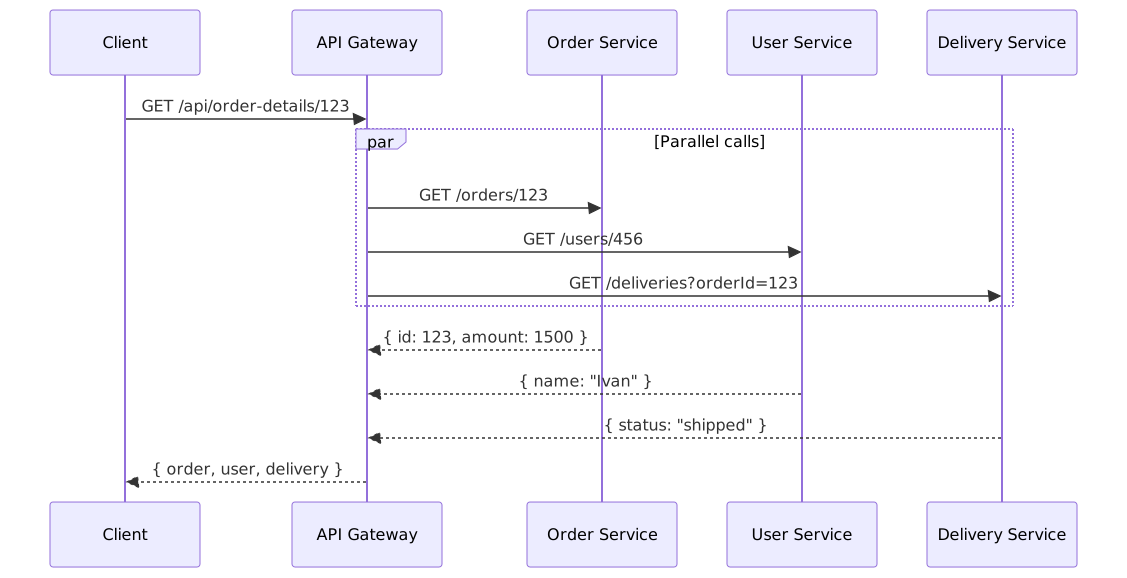
@Controller()
export class OrderDetailsAggregationController {

  constructor(private readonly http: HttpService) {}

  @Get('api/order-details/:orderId')
  async getOrderDetails(
    @Param('orderId') orderId: string,
  ): Promise<OrderDetailsResponse> {

    const get = <T>(url: string): Promise<T | null> =>
      firstValueFrom(this.http.get<T>(url))
        .then((response) => response.data)
        .catch(() => null);

    const [order, user, delivery] = await Promise.all([
      get<OrderDto>(`http://order-service/orders/${orderId}`),
      get<UserDto>(`http://user-service/users/${await this.userIdFromOrder(orderId)}`),
      get<DeliveryDto>(`http://delivery-service/deliveries?orderId=${orderId}`),
    ]);

    return new OrderDetailsResponse(order, user, delivery);
  }
}
When you need it: the client needs data from 2–3 services, and the aggregation is simple, without business logic.
When you don't: you need complex transformation or filtering of the data — that's a job for a BFF.
Backend for Frontend (BFF)
Problem. You have a mobile app, a web admin panel, and a public website. Each needs its own set of data: mobile wants the bare minimum (to save bandwidth), the admin panel wants the full set with an action log, and the public site wants only the open data. A single shared API can't serve all of them well.
Solution. For each type of client you create a separate BFF service. It talks to the domain services itself and returns only what that particular client needs. There's no business logic in a BFF — only selecting and formatting data.

The Mobile BFF returns only the fields that are needed:
// Mobile BFF — minimal data
@Controller('api/orders')
export class MobileOrderController {

  constructor(
    private readonly orderClient: OrderServiceClient,
    private readonly userClient: UserServiceClient,
  ) {}

  @Get(':id')
  async getOrder(@Param('id') id: string): Promise<MobileOrderResponse> {
    const order = await this.orderClient.getOrder(id);
    const user = await this.userClient.getUser(order.userId);

    return new MobileOrderResponse(
      order.id,
      order.status,
      order.totalAmount,
      user.firstName,
    );
  }
}
The Web BFF for the administrator pulls data from more sources and adds fields that aren't present in the mobile version.
How a BFF differs from an API Gateway: the Gateway is an infrastructure component that routes requests. A BFF is an application service that knows about its client's needs and adapts the data. They aren't competitors: the Gateway sits in front of the BFF.
When you need it: more than one type of client with different data needs.
When you don't: a single type of client — an API Gateway is enough.
Gateway Offloading
Problem. Every service configures SSL on its own, checks the token, sets security headers, and compresses responses. That's identical work in every service.
Solution. All of it is moved onto the Gateway. Internal services run over plain HTTP without SSL and without token checking — they receive the user identifier ready-made from the X-User-Id header.
app.use(jwtAuthMiddleware);
app.use(rateLimit({
  windowMs: 1_000,
  limit: 100,
  keyGenerator: (req) => req.ip,
}));
app.use(helmet({
  frameguard: { action: 'deny' },              // X-Frame-Options: DENY
  hsts: { maxAge: 31_536_000 },                // Strict-Transport-Security
  noSniff: true,                               // X-Content-Type-Options: nosniff
}));
An internal service simply reads the header — it doesn't deal with JWT:
@Controller('orders')
export class OrderController {

  @Get(':id')
  getOrder(
    @Param('id') id: string,
    @Headers('x-user-id') userId: string,
  ): Promise<OrderDto> {
    return this.orderService.getOrder(id, userId);
  }
}
What to offload to the Gateway: SSL termination, JWT signature verification, rate limiting, CORS, security headers.
What to keep in the service: authorization (checking permissions on a specific resource) — the Gateway doesn't know the business logic; request body validation — it depends on the domain model.
Sidecar
Problem. Collecting metrics, encrypting traffic, retrying on errors — every service needs these. If the services are written in different languages, the same logic has to be written in each of them.
Solution. Alongside each service, a helper process (a sidecar) runs. It takes on the infrastructure concerns, while the main service focuses only on business logic. In Kubernetes, the sidecar and the main container live in the same Pod and communicate over localhost.

spec:
  containers:
    - name: order-service
      image: order-service:1.0
      ports:
        - containerPort: 8080

    - name: envoy-sidecar
      image: envoyproxy/envoy:v1.28
      ports:
        - containerPort: 9901
        - containerPort: 15001
        - containerPort: 15006
When you need it: services in different languages, and you need uniform traffic encryption or network-level retries.
When you don't: all services in one language — a library is simpler (opossum for Node.js, tenacity for Python).
Service Mesh
Problem. A sidecar solves the problem for a single service. But when there are dozens of services — who configures all those proxies? How do you control which service is allowed to talk to which? How do you turn on encryption for the whole system at once?
Solution. Service Mesh is an infrastructure layer that manages the entire network between services. It consists of two parts:
- Data Plane — proxies (Envoy) in each Pod, through which all traffic flows.
- Control Plane — the managing component (Istio, Linkerd) that distributes configuration to all the proxies.

Example: Istio shifts 20% of traffic to a new version of the service and configures retries:
apiVersion: networking.istio.io/v1beta1
kind: VirtualService
metadata:
  name: order-service
spec:
  hosts:
    - order-service
  http:
    - route:
        - destination:
            host: order-service
            subset: v1
          weight: 80
        - destination:
            host: order-service
            subset: v2
          weight: 20
      retries:
        attempts: 3
        perTryTimeout: 2s
        retryOn: 5xx,reset,connect-failure
API Gateway vs Service Mesh: the Gateway handles traffic "from the outside in" (client → system). Service Mesh manages traffic inside the system (service → service).
When you need it: dozens of services, strict security requirements (encryption between all services), fine-grained traffic control.
When you don't: fewer than 10 services — the management complexity outweighs the benefit; libraries like opossum are enough.
Strangler Fig
Problem. You have a working monolith that needs to move to microservices. Rewriting everything at once is risky and takes a year. Freezing new features during the migration is not an option.
Solution. New functionality is built in microservices. The old functionality is switched over gradually: traffic leaves the monolith for the new services as they become ready. The monolith keeps running for everything that hasn't moved yet.
The name comes from the strangler fig plant: it wraps around a tree and, over time, replaces it.
// Gateway during the migration phase
app.use('/api/orders',
  createProxyMiddleware({ target: 'http://order-service:8080' }));

app.use('/api/users',
  createProxyMiddleware({ target: 'http://user-service:8080' }));

// The old monolith — everything else (registered last)
app.use('/api',
  createProxyMiddleware({ target: 'http://monolith:8080' }));
Switching via a flag lets you roll back if something goes wrong:
@Injectable()
export class OrderFacade {

  private readonly useNewService: boolean;

  constructor(
    private readonly legacyService: LegacyOrderService,
    private readonly newServiceClient: NewOrderServiceClient,
    config: ConfigService,
  ) {
    this.useNewService = config.get('FEATURE_USE_NEW_ORDER_SERVICE', false);
  }

  getOrder(id: string): Promise<OrderDto> {
    if (this.useNewService) {
      return this.newServiceClient.getOrder(id);
    }
    return this.legacyService.getOrder(id);
  }
}
A typical migration order: pick the least coupled module → build a microservice with the same API → switch traffic through the Gateway → compare responses → remove the code from the monolith.
When you need it: migrating off a monolith without pausing development.
When you don't: a new project — start with the architecture you need from the outset; a monolith that works well and isn't in the way — leave it alone.
Anti-Corruption Layer (ACL)
Problem. Your service integrates with an external system that has its own data model: fields are named txn_id, amount_cents, sts, and statuses come as codes "S"/"F"/"P". If you use these models directly in your business logic, all your code starts to depend on someone else's conventions. When the external system is replaced, you'll have to rewrite half the service.
Solution. Between your service and the external system you place a translator layer. It takes in the "foreign" models and converts them into clear domain objects — and back again when needed.

// The external system's model
interface ExternalPaymentResponse {
  txn_id: string;
  amount_cents: number;
  ccy: string;
  sts: string;          // "S" = success, "F" = failed, "P" = pending
  created_ts: number;
}

// Our domain model — clear names
interface Payment {
  transactionId: string;
  amount: Money;
  status: PaymentStatus;
  createdAt: Date;
}

// The translator — isolates the external model from the domain
@Injectable()
export class PaymentMapper {

  toDomain(external: ExternalPaymentResponse): Payment {
    return {
      transactionId: external.txn_id,
      amount: Money.fromMinorUnits(external.amount_cents,
        Currency.fromCode(external.ccy)),
      status: this.mapStatus(external.sts),
      createdAt: new Date(external.created_ts * 1000),
    };
  }

  private mapStatus(externalStatus: string): PaymentStatus {
    switch (externalStatus) {
      case 'S': return PaymentStatus.SUCCESS;
      case 'F': return PaymentStatus.FAILED;
      case 'P': return PaymentStatus.PENDING;
      default:
        throw new Error(`Unknown payment status: ${externalStatus}`);
    }
  }
}
When you need it: integrating with an external API or a legacy system that has a foreign data model; when a replacement of the external system is planned.
When you don't: the external API fully matches your data model and no replacement is planned.
Service Registry and Service Discovery
Problem. Services scale dynamically: today there are 3 instances of the Order Service, tomorrow 10. Instances come and go with deployments, autoscaling, and restarts. Hardcoding the addresses by hand is impossible.
Solution. A Service Registry is a directory where each service registers itself on startup. Other services look up addresses through this registry. There are two approaches:
- Client-Side Discovery — the client asks the registry itself (Consul, etcd) and picks an instance.
- Server-Side Discovery — the request goes through a load balancer that knows about the registry (Kubernetes Services).

With Consul, the client looks up addresses by service name — the registry itself returns the live instances:
import Consul from 'consul';

const consul = new Consul();

async function paymentServiceUrl(): Promise<string> {
  const nodes = await consul.health.service({
    service: 'payment-service',
    passing: true,
  });
  const node = nodes[Math.floor(Math.random() * nodes.length)];
  return `http://${node.Service.Address}:${node.Service.Port}`;
}

const createPayment = async (request: CreatePaymentRequest): Promise<PaymentDto> =>
  (await axios.post(`${await paymentServiceUrl()}/payments`, request)).data;
In Kubernetes, service discovery is built in: each Service gets a DNS name, and a call to http://payment-service:8080 automatically reaches one of the Pods.
apiVersion: v1
kind: Service
metadata:
  name: payment-service
spec:
  selector:
    app: payment-service
  ports:
    - port: 8080
Which to choose when: Consul/etcd — if you don't use Kubernetes or need extra registry features. Kubernetes DNS — if you're on Kubernetes, it's built in and there's nothing to configure.
Where to start
If you're building a system out of several services:
- API Gateway + Gateway Routing — a single entry point, path-based routing.
- Service Discovery — Kubernetes DNS if you're on K8s; otherwise Consul.
- Gateway Offloading — move SSL and token checking onto the Gateway.
As you grow:
- BFF — when a second type of client appears.
- Gateway Aggregation — when clients need data from several services in a single request.
- Anti-Corruption Layer — when integrating with a legacy system that has a foreign data model.
For large systems:
- Service Mesh — when managing traffic between dozens of services becomes complex.
- Strangler Fig — when you need to migrate off a monolith gradually.
In short
- API Gateway — a single entry point that takes on auth, rate limiting, and logging.
- Gateway Routing — routing rules: which request goes to which service.
- Gateway Aggregation — one client request → several parallel calls → one response.
- BFF — a dedicated adapter service for each client type (mobile, web, public).
- Gateway Offloading — cross-cutting concerns (SSL, tokens, headers) handled once on the Gateway instead of in every service.
- Sidecar — a helper process next to a service that takes on infrastructure concerns regardless of language.
- Service Mesh — managing the entire inter-service network through a Control Plane and Envoy proxies.
- Strangler Fig — a gradual migration off a monolith: traffic is switched piece by piece, and rollback is always possible.
- Anti-Corruption Layer — a translator layer between your domain model and a foreign API.
- Service Registry & Discovery — a registry of live service instances; in Kubernetes it's built in.
Further reading
- Resilience patterns — Circuit Breaker, Retry, Bulkhead.
- Distributed patterns — Saga, Outbox, Event Sourcing.
- Apache Kafka — asynchronous communication between services.